Short answer
- Your dot gets memories from ChatGPT and makes its own, including from connected apps. You currently cannot view, edit or delete individual dot memories.
- Reset is the only way to delete your dot's own memories. It deletes its conversations, saved memories and scheduled tasks.
- Reset does not delete files, Codex threads or ChatGPT conversations your dot created, or your ChatGPT memories.
Your dot is built to remember, which makes it useful across days and channels. It also makes deletion a blunt tool right now: there is no per-memory delete, only a full reset.
Where your dot’s memories come from
So memory flows both ways, and from three places:
- From ChatGPT. Your ChatGPT memories and recent conversation context.
- From your conversations with your dot. These can also feed back into ChatGPT memory.
- From connected apps. Your dot can review connected information proactively and form memories from it. See connect apps.
In the mobile app, Customize → Memory in your dot’s profile shows what ChatGPT remembers, using your shared ChatGPT memory settings.
What you can and can’t control today
| You want to… | What OpenAI documents |
|---|---|
| Stop ChatGPT memories flowing to your dot | Turn off Memory in ChatGPT. This “stops that sharing,” but “does not delete information that your dot has already received.” |
| See or edit a single dot memory | Not possible yet. “You currently cannot view, delete or directly modify individual dot memories.” |
| Stop your dot learning from an app | Disconnect the plugin. It stops new access, but it “does not delete information your dot has already built into its context.” |
| Delete your dot’s own memories | Reset (delete) your dot. It is the only documented way. |
| Know how long it keeps context | “For as long as you keep your dot.” |
OpenAI also says your dot’s context “does not retain credentials, images, or screenshots.”
What reset deletes vs. what survives
OpenAI’s two help articles, side by side. Read this before you press Reset.
| Item | Deleted by reset? | Source |
|---|---|---|
| Your dot itself | Yes | Getting started: reset “deletes your dot” |
| Its conversations | Yes | Getting started |
| Its saved memories and context, including what it learned from connected apps | Yes | Getting started and safety FAQ |
| Its scheduled tasks | Yes | Getting started |
| Files your dot created | No, stored separately | Safety FAQ |
| Codex threads your dot created | No, stored separately | Safety FAQ |
| ChatGPT conversations your dot created | No, stored separately | Safety FAQ |
| Your ChatGPT memories | No, they remain | Safety FAQ |
| Your custom rules | Not documented | Not covered |
| Plugin connections in ChatGPT | Not documented | Not covered |
How to reset your dot
OpenAI’s help center documents these steps:
- Open your dot’s profile.
- Choose •••, then Reset.
- Review what will be deleted.
- Choose Reset to confirm, or Cancel to back out.
- To start again, create a new dot. The help center names the desktop app or desktop web; OpenAI’s learn docs now list the mobile app too. See create your dot.
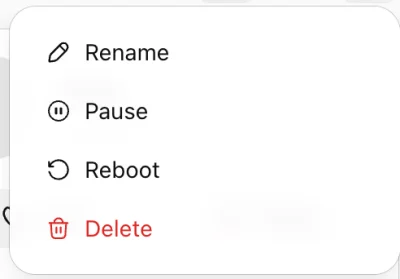
Pause vs. reset
To stop your dot’s current work for a while, pause it instead. Pause stops only the current main task; cancel recurring tasks separately in Scheduled.
| Pause | Reset | |
|---|---|---|
| How | Profile → ••• → Pause | Profile → ••• → Reset → review → Reset |
| Reversible | “Paused • Tap to resume” | Create a new dot |
| Memories | OpenAI doesn’t describe pause as deleting anything | Deleted |
| Scheduled tasks | Keep running: pause doesn’t cancel future scheduled runs | Deleted |
| Good for (our reading) | Travel, a busy week, or checking something before it acts again | Removing what your dot learned, or starting over |
Before you reset: a checklist
- Copy anything you need from your conversations. They are deleted with your dot.
- Write down your scheduled tasks. You’ll have to recreate them. The scheduled tasks template makes that quicker.
- Note your custom rules. OpenAI doesn’t say whether they survive a reset. See custom rules.
- Disconnect apps you no longer want in use. Reset deletes what your dot learned, but plugin permissions are shared with ChatGPT, ChatGPT Work and Codex.
- Check ChatGPT memory separately. It is not touched by a reset.
Training and human review
Beyond memory, OpenAI’s safety FAQ covers:
- Personal plans. Whether your content is used to improve models is governed by the “Improve the model for everyone” setting.
- Business, Enterprise and Edu. Content is not used for training by default.
- Background research. “We don’t train directly on proactive background research or its notes.”
- Human review. It may occur in limited circumstances, even with model improvement turned off.
- Data requests. You can make a data subject access request through OpenAI’s Privacy Portal or by emailing [email protected].
For how dots fit into ChatGPT as a whole, see what ChatGPT dots are.
ChatGPT dots prompts to try
-
Friday review and next-week plan
Every Friday: what moved, what slipped, and your top three priorities for next week.
-
Keep a sales proposal current
Keeps a proposal in step with the latest emails and call notes, showing every change.
-
Route updates by channel
Routine progress stays in ChatGPT; decisions and risks reach you in Slack.
Official sources
Every product fact on this page was checked against the pages below. Last verified . Spot something out of date? Tell us.
- OpenAI Control your dot — ChatGPT Learn (Stop work) Accessed Oct 10, 2026
- OpenAI Getting started with your dot — Memory, Pause and Reset Accessed Oct 10, 2026
- OpenAI Dots privacy, security, and safety FAQs — Memory and data Accessed Oct 10, 2026
- OpenAI Get started with your dot — ChatGPT Learn (setup on mobile or desktop) Accessed Oct 10, 2026
Questions people ask
Can I delete one thing my dot remembers?
Not yet. OpenAI says you currently cannot view, delete or directly modify individual dot memories. The only documented way to delete your dot's own saved memories is to delete (reset) your dot.
If I turn off Memory in ChatGPT, does my dot forget?
No. Turning off Memory in ChatGPT stops the sharing between ChatGPT and your dot, but it does not delete information your dot has already received.
Does resetting my dot delete the files it made?
No. OpenAI says files, Codex threads and ChatGPT conversations your dot created are stored separately and are not deleted when you delete your dot. Your ChatGPT memories also remain.
Does my dot remember my passwords or screenshots?
OpenAI says your dot's context does not retain credentials, images or screenshots.
Is pausing my dot the same as resetting it?
No. Pause is reversible from your dot's profile with “Paused • Tap to resume.” Reset deletes your dot, and you then create a new one.